Creating an Ergonomic Home Office: Tips for Productivity and Comfort
Creating an ergonomic home office has become essential for professionals who spend significant time working from home. A well-designed ergonomic workspace not only enhances productivity but also promotes physical health, reduces the risk of repetitive strain injuries, and creates a more comfortable environment for focused work. This guide will walk you through the key principles and practical tips for designing a home office that supports both your body and your workflow.
Understanding Ergonomic Principles for Home Offices
Ergonomics is the science of designing environments to fit the people who use them. In a home office context, this means creating a space that minimizes physical stress, supports natural movement, and adapts to your individual needs. The goal is to align your workspace with your body's natural posture, reducing strain on your neck, shoulders, back, wrists, and eyes.
Essential Ergonomic Furniture Selection
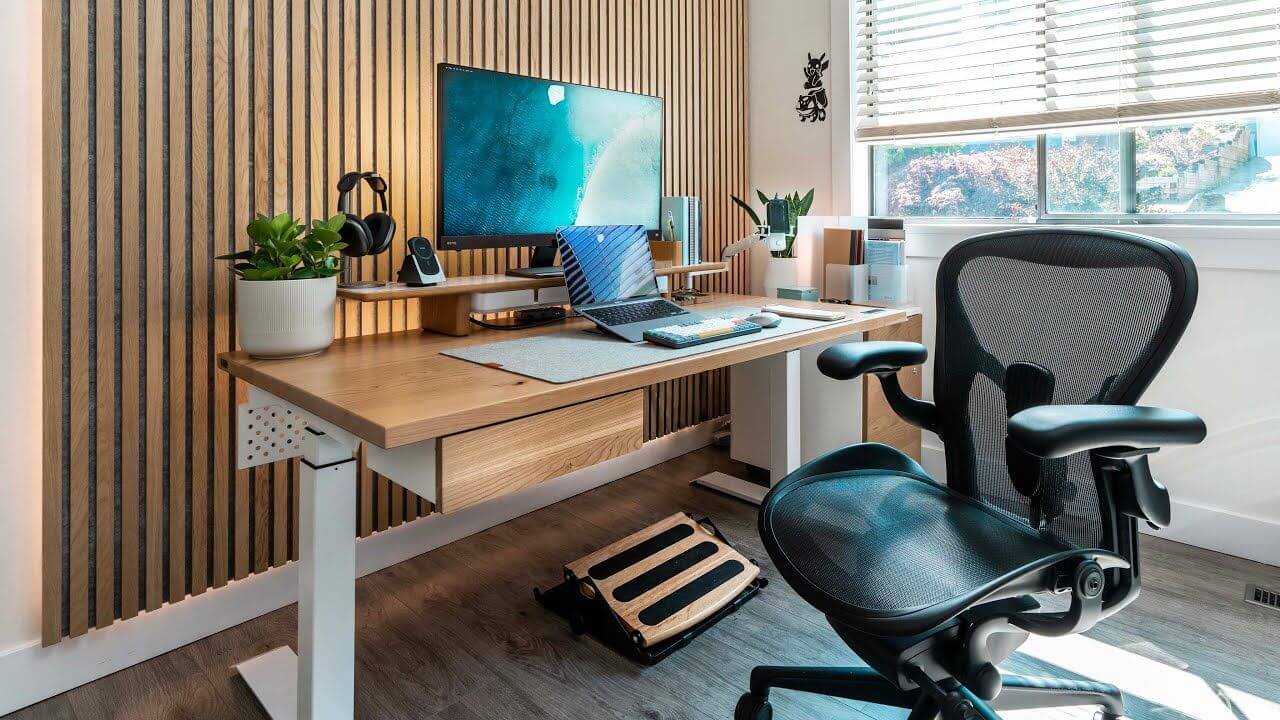
The foundation of any ergonomic home office is the right furniture. Start with an adjustable desk that allows you to work in both sitting and standing positions. A sit-stand desk promotes movement throughout the day, reducing the health risks associated with prolonged sitting. Pair this with an ergonomic chair that provides proper lumbar support, adjustable armrests, and comfortable cushioning. Look for chairs that allow you to maintain a 90-degree angle at your hips, knees, and elbows.
Optimal Monitor and Screen Setup
Proper monitor placement is critical for reducing eye strain and neck tension. Position your primary monitor at eye level, about an arm's length away from your face. If using multiple monitors, ensure the primary screen is directly in front of you, with secondary screens at a slight angle. Adjust the brightness and contrast to match your ambient lighting, and consider using a blue light filter to reduce eye fatigue during long work sessions.
Keyboard and Mouse Configuration
Your keyboard and mouse should be positioned to allow your wrists to remain in a neutral, relaxed position. Consider using an ergonomic keyboard that has a split design or negative tilt to reduce wrist extension. An ergonomic mouse that fits comfortably in your hand can help prevent repetitive strain injuries. Keep both devices close to your body, so you don't have to reach forward, which can strain your shoulders.
Lighting for Eye Comfort and Productivity
Good lighting is essential for an ergonomic home office. Natural light is ideal, but if that's not available, use a combination of ambient and task lighting. Avoid harsh overhead lighting that creates glare on your screen. Instead, use a desk lamp with a soft, diffused light for focused tasks, and ensure the light source is positioned to avoid shadows on your work surface. Adjustable lighting with dimmer controls can help you adapt to different times of day and tasks.
Organization and Workflow Optimization
A cluttered workspace can lead to mental distraction and physical discomfort. Keep frequently used items within easy reach to minimize stretching and reaching. Use cable management solutions to keep cords organized and prevent tripping hazards. Consider implementing a paper management system to reduce clutter. Arrange your workspace to support your workflow, with tools and materials positioned logically based on how you use them throughout the day.
Additional Comfort and Health Features
Beyond the basics, there are several additional features that can enhance the ergonomics of your home office. A footrest can help maintain proper posture by supporting your feet when sitting. An anti-fatigue mat provides cushioning when standing at your desk. Consider adding plants to improve air quality and create a more calming environment. Regular breaks and stretching exercises are also important components of an ergonomic routine—aim for a short break every 30 minutes to stand, stretch, and refocus.